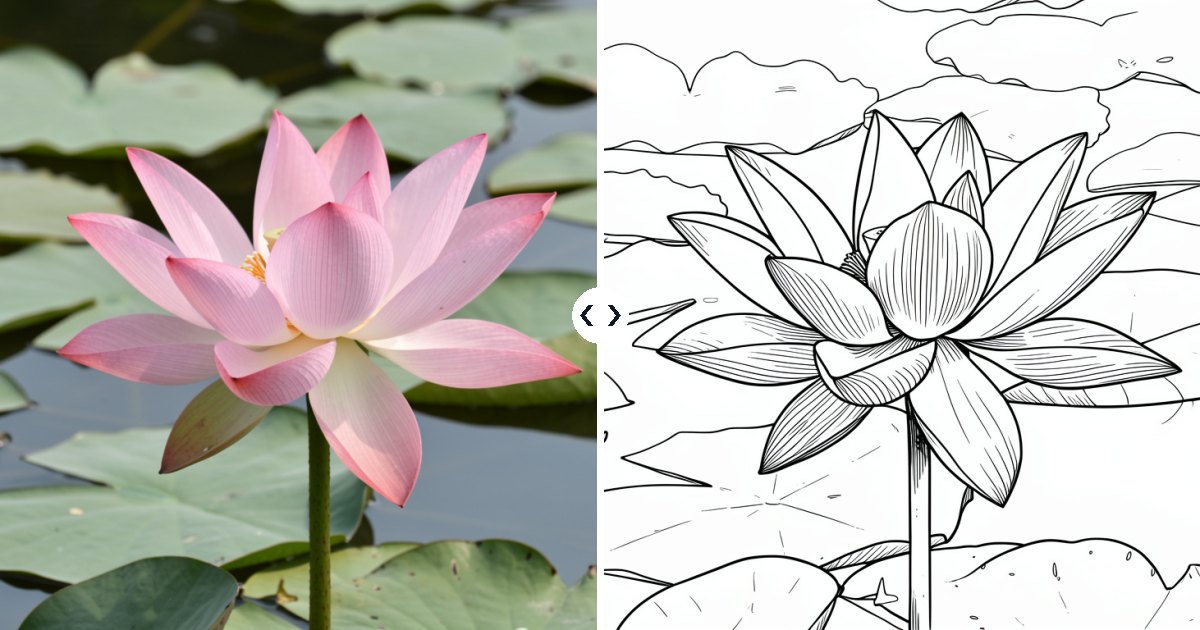
Picmera’s free photo editor can turn any photo into a clean black-and-white line drawing in seconds. It’s perfect for colouring pages, tattoo sketches, craft templates and minimalist wall art.
Kids love colouring pictures of their own pets, house or holiday. Adults use line drawings for embroidery patterns, wood burning, card designs and drawing practice. Here’s how to make one.
 |
 |
How to make a line drawing from a photo
- Open the Picmera photo editor.
- Upload a clear photo (JPG, PNG or WebP, up to 8 MB).
- Choose the Line drawing style. No description is needed.
- Tick the permission box and click Edit photo.
- After 10–20 seconds, compare the result with your original and click Download result.
Which photos make the best line drawings
- Simple backgrounds. A pet on a plain floor turns into a cleaner drawing than a pet in a cluttered room.
- Clear outlines. Flowers, animals, buildings, cars and portraits with good lighting work best.
- One main subject. Crowds and busy streets produce too many small lines to colour comfortably.
- Remove the background first for the cleanest result: use the background remover, then turn the cut-out into a line drawing.
How to print a colouring page
- Download the line drawing.
- Open it on your computer or phone and choose Print.
- Select Fit to page and A4 or Letter paper.
- Use plain printer paper for crayons and pencils, or thicker card stock for markers and paint.
Tip: make a whole colouring book by turning a set of family photos into line drawings and printing them together.
Creative uses for line drawings
- Personalised colouring pages for birthday parties
- Embroidery, wood-burning and stencil templates
- Sketch references for drawing practice
- Minimalist wall art and greeting cards
- Teaching materials for classrooms
Frequently asked questions
Is the photo to line drawing tool free?
Yes. You get 10 free uses a day across all Picmera tools, with no sign-up and no watermark.
Can I add colour later?
Yes. Print it and colour by hand, or open the downloaded image in any drawing app and fill the areas digitally.
Why does my drawing have too many lines?
Busy photos create busy drawings. Try a photo with a simpler background, or remove the background first.
Can I sell colouring pages I make?
Images you create are yours to use, as long as you had the right to use the original photo and follow our terms of use.
Make your own colouring pageTurn a family photo or pet picture into a line drawing in seconds.